THE LUNAR STUDY / SURFACE & SUNLIGHT
One surface.
Changing light.
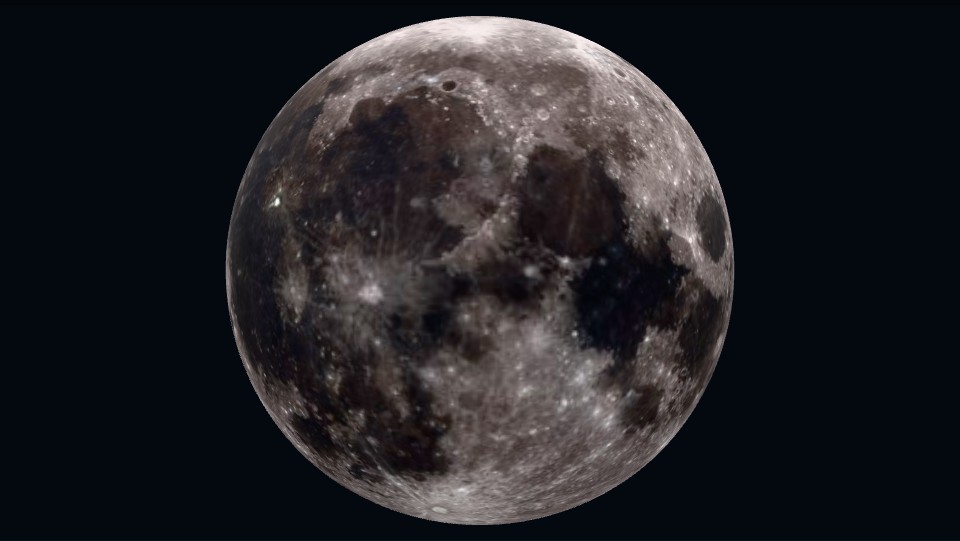
The dark markings on the Moon and the darkness of a lunar phase are different things. Inspect the mapped surface, turn to the opposite hemisphere, then compare with the illuminated fraction on a chosen date.
LOOK, THEN COMPARE
Read the markings.
Start with the large dark patches. Turn the model halfway around and compare their distribution. Change the viewing height to inspect the polar regions.
The static study above works without loading the 3D viewer.
WHAT CHANGES IN THE SKY?
The shadow is not a surface marking.
This model shows surface color under a fixed display light. It is not a simulation of the current phase, local orientation, libration or telescope view. Its smooth geometry omits the relief of mountains and craters.
Now open the date finder. Compare dates about a week apart: the illuminated fraction changes while the surface itself remains the same. Use the sky map to check where the Moon is from your chosen city.
Source, rights and performance
The source model and preview are from NASA Scientific Visualization Studio’s Moon 3D Models for Web, AR, and Animation, using Lunar Reconnaissance Orbiter imagery. Credit: NASA’s Goddard Space Flight Center / LRO. The model’s geometry is preserved; its embedded texture has been reduced to 1024 pixels for the web. The 1.8 MB model and self-hosted viewer load only after you choose Open 3D. There is no automatic rotation or playback. The image and written comparison remain available if 3D fails.